
Produce more designs, with improved accuracy, in less time
Make your design process more efficient with design automation.
Manufacturing custom products requires design engineering teams to spend a significant amount of time on “same but different” designs. Manual engineering design can quickly become one of the biggest bottlenecks, with a backlog of CAD drawings leading to errors, delays, and lost sales. Design automation removes much of the manual work associated with traditional CAD workflows. By automating time-sensitive and repetitive upfront activities, manufacturers produce more designs in less time, and design engineers have more time to focus on higher-value work, such as new product development.
How design automation speeds up design cycles
Rules-based automation reduces errors and streamlines workflows.
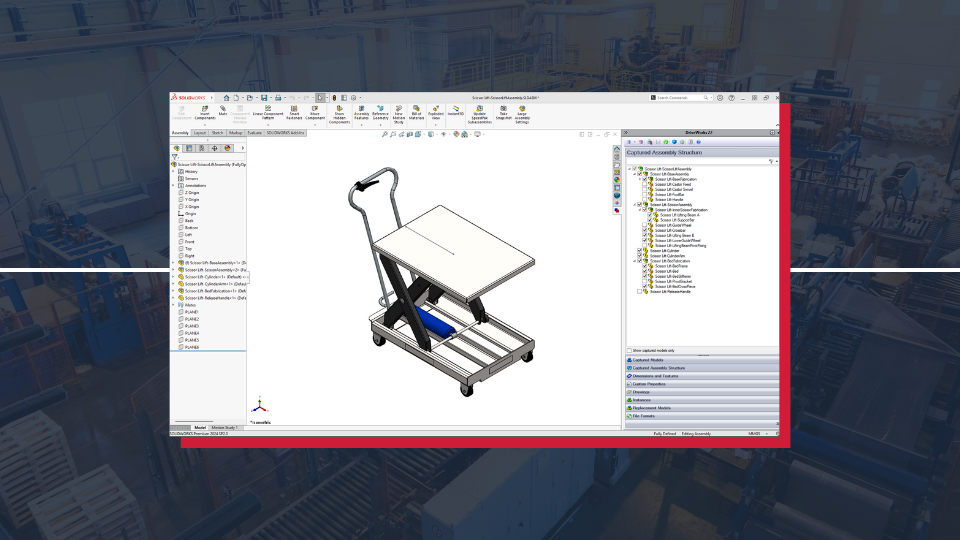
Capture & reuse design engineering knowledge
Design automation uses rules-based logic based on engineering knowledge. It captures detailed design know-how for a wide range of variables and automatically applies the logic to new designs. Embedding logic and standards into the design process ensures consistency and improves accuracy. Monotonous design revision tasks that previously required a significant amount of time and resources are now managed by the design automation tool. This not only speeds up design output but also frees up design engineers to work on more creative work, such as new product development.
Minimize errors
Large volumes of manual design tasks have an associated risk of errors. Manual errors in the design process can lead to longer design cycle times, incorrect quotes, and unnecessary rework. Design automation tools work with rules and conditions set by design engineers, so design revisions are automatically generated according to those pre-set parameters. This reduces errors and improves accuracy and quality. With a “right first time” approach to designs, manufacturers produce a bigger volume of designs in less time. Additionally, quality control checks can be embedded within the design process to ensure products meet both industry standards and customer expectations.
Remove bottlenecks
Design automation technology removes inefficiencies from the design workflow by automating repetitive tasks and reducing reliance on manual input. Traditional design processes often involve multiple revisions and inter-departmental exchanges, which can lead to bottlenecks. Design automation tools intelligently automate these processes, enabling smoother collaboration between teams, removing bottlenecks, and delivering faster design completion. Subsequently, streamlined workflows reduce design times for custom products, enabling manufacturers to increase their output and produce more designs in less time.
DriveWorks design automation for SOLIDWORKS®
DriveWorks design automation technology enables manufacturers to capture and reuse design, manufacturing, and cost estimation knowledge to deliver custom products faster and with greater accuracy, without using complex macros, design tables, or configurations.
DriveWorks is exclusively designed for SOLIDWORKS, making it the ideal choice for any manufacturing company using SOLIDWORKS 3D CAD. DriveWorks is committed to delivering innovative solutions and has been recognized with SOLIDWORKS Certified Gold Partner status since 2002.
Manufacturers using DriveWorks reduce design time
Manufacturers of all sizes, across all industries, produce more designs in less time with DriveWorks design automation.
Faster design times
HVAC manufacturer, HW Ventilation, produces designs 10x faster.
Increased drawing throughput
Mobility product manufacturer, Bruno, increased drawing throughput by 15%.
Reduced drawing time
Heavy lifting equipment manufacturer, Liftech, reduced crane drawing time from 4 days to 10 minutes.
Speeding up custom CAD file creation
Custom gearbox and motor manufacturer, IBR Redutores, speed up custom CAD file creation from 8 hours to 10 minutes.
Request a demo with a DriveWorks expert today
Get a head start on design automation
Book a design automation demo with a DriveWorks technical specialist. They’re experts in design automation and will show you how easy it can be to get started with design automation.